
Recently updated on July 21st, 2026 at 11:13 am
Virtual travel is becoming one of the most exciting ways to explore the world without leaving your home. But many people assume it’s expensive. The truth is, you don’t need a high-end setup to start your journey.
If you’re looking for cheap virtual travel options, you don’t need to spend a lot to explore the world in VR. In this guide, we’ll break down the cheapest ways to experience virtual travel, whether you’re just getting started or looking for budget-friendly options.
List of Budget & Cheap Virtual Travel Options...
Can You Do Virtual Travel Without VR?
Yes, you can experience virtual travel using a laptop, PC, or even a mobile phone. Platforms like Google Earth and YouTube offer plenty of virtual tours and 360° videos.
However, these methods are not covered in depth in this article because they are not fully immersive.
You’re still looking at a flat screen, which removes the “being there” feeling that makes virtual travel truly special.
Method 1: Use Google Cardboard (The Cheapest Entry Point)
If you want to experience real immersion without spending much, Google Cardboard is your best starting point.
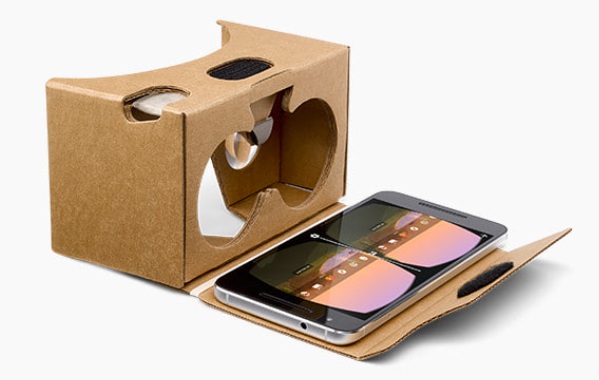
Google Cardboard (Credit: Google)
Why it’s great:
- Extremely affordable (sometimes under $10)
- Works with most smartphones
- Easy to set up
What you need:
- A smartphone
- A VR-compatible app (like YouTube VR)
This is perfect for beginners who want to try virtual travel without committing to expensive gear. With Google Cardboard, you’ll usually need to hold the headset in place while using it.
Method 2: Use Mobile VR Headsets
If you want something slightly better than cardboard, consider upgrading to a mobile VR headset or also known as smartphone-based VR headset.

VR BOX, one example of Mobile VR Headsets
Benefits:
- More comfortable than cardboard
- Better viewing experience
- Still budget-friendly (sometimes under $50)
Popular options include brands like VR BOX, VRG and VR Shinecon. You’ll still use your smartphone, but the experience feels more stable and immersive compared to basic cardboard viewers.
As compared with the previous method, Google Cardboard typically requires you to hold the viewer against your face, which can become uncomfortable over time.
On the other hand, mobile VR headsets are designed with adjustable head straps, giving you a hands-free experience and better comfort for longer sessions.
Method 3: Rent a VR Headset Instead of Buying
Buying a VR/MR headset like the Meta Quest 3 or Apple Vision Pro can be expensive (or damn pricey!). A smarter move? Just rent one.
Why renting is better:
- Much cheaper upfront
- Great for short-term use
- Perfect for testing before buying
In many areas, VR rental services are available for daily or weekly rates, making it one of the most cost-effective ways to enjoy high-quality virtual travel.
Method 4: Visit a VR Arcade
If you don’t want to deal with setup at all, just head to a VR arcade.
What you get:
- High-end VR equipment
- Premium virtual travel experiences
- No maintenance or setup needed
VR arcades often offer curated experiences where you can “travel” to famous destinations or explore virtual worlds.
You simply pay per session and choose the experience that interests you most where it is super convenient and beginner-friendly.
Bonus: Use Free VR Travel Apps
You don’t need to spend money on apps to explore the world. Some great free options include:
- YouTube 360 & VR-format videos
- Meta TV's immersive videos
- DeoVR
These apps allow you to visit real-world locations, streets, and landmarks in immersive VR.
Final Thoughts
Virtual travel doesn’t have to be expensive. Whether you’re using a simple cardboard viewer or trying out a high-end headset through rental or VR arcades, there are plenty of ways to explore the world on a budget.
If you’re just starting out, begin small, then upgrade your experience over time.
Because at the end of the day, it’s not about how much you spend… it’s about how far you can go.
If you're new to virtual travel, you might want to check out our beginner-friendly guide to better understand how it works.
Credit: Photo above by Julia M Cameron.
About The Author
